
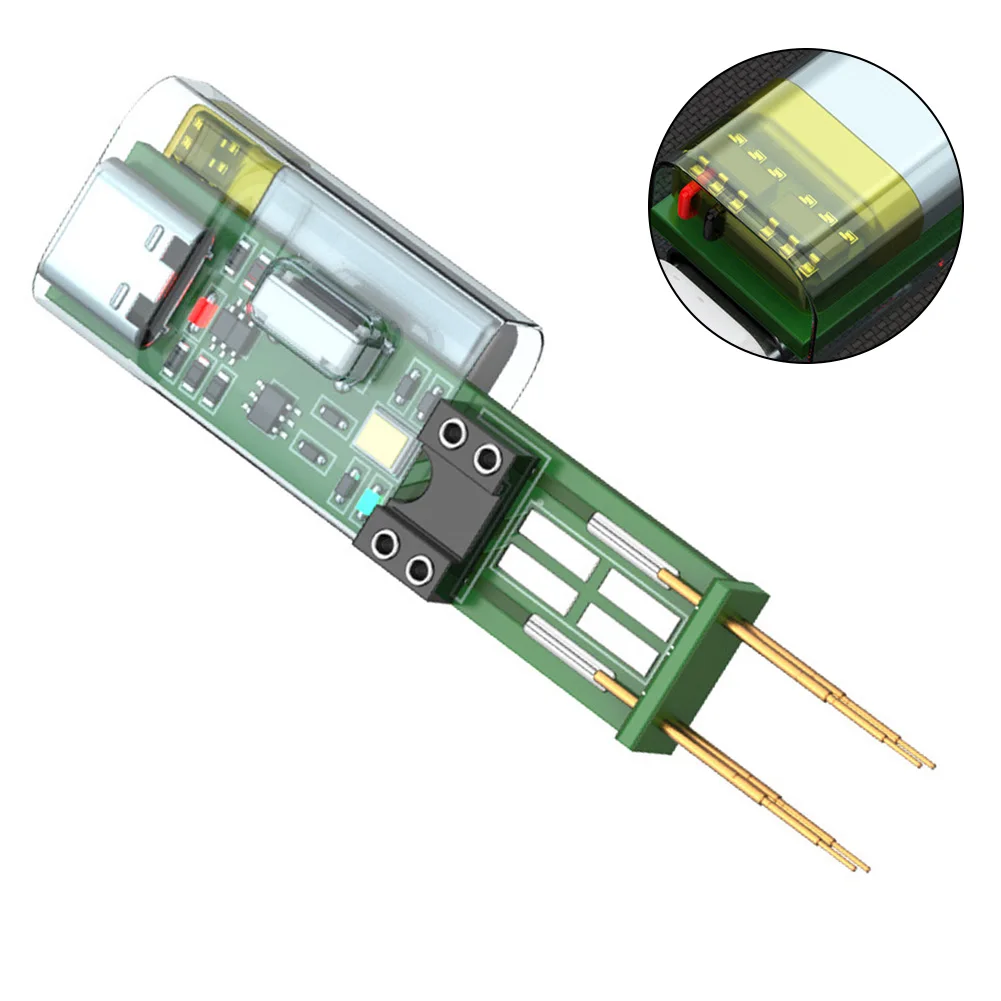
Optocoupler Tester DIY Tool – 4-Pin Detection Module
Elevate your electronics repair skills with the Optocoupler Tester DIY Tool. This versatile module is designed for testing 4-pin optocouplers efficiently. With USB and Type-C interfaces, it caters to both beginners and advanced users. This versatility makes it an essential tool for dynamic tech projects.
Features of the Optocoupler Tester DIY Tool
- Comprehensive Testing: Detects the functionality of 4-pin optocouplers with precision.
- Multiple Generations Available: Choose from 3rd to 6th generation models for your specific needs.
- User-Friendly Design: Equipped with clear indicators for power and testing results.
- Versatile Power Options: USB and Type-C interfaces ensure compatibility with modern setups.
- Compact and Portable: Lightweight design makes it easy to carry and use on-site.
Specifications:
- Part Name: Optocoupler Tester
- Material: PCB + Electronic Components
- Color: Green
- Size: Refer to product images
- Generations:
- 3rd Generation: USB interface, indicator light only during testing
- 4th Generation: Type-C interface, constant power indicator light
- 5th Generation: Type-C interface, supports plug-in and patch testing
- 6th Generation: Type-C interface, flashlight lighting, rechargeable battery
Why Choose This Tool for Your DIY Projects?
- Dynamic Functionality: Ideal for testing and repairing 4-pin optocouplers in various devices.
- Tech-Ready Features: Supports advanced testing modes with upgraded capabilities.
- DIY-Friendly: Perfect for students, engineers, and hobbyists looking to enhance their repair toolkit.
- Easy to Use: Clear instructions and simple design make it accessible for all skill levels.
How to Use:
- Prepare the Board: Ensure the motherboard is powered off and capacitors are fully discharged.
- Identify Pin 1: Locate the marked pin on the optocoupler and align it with the test board.
- Connect Power: Plug in the USB or Type-C cable to power the tester.
- Perform the Test: Use the probe to contact the optocoupler’s pins. Flashing light indicates functionality.
- Verify Results: For inconsistent readings, re-test using the breadboard socket.
Applications:
- Repairing electronics
- Testing optocoupler circuits
- Enhancing DIY technology projects
- Learning circuit testing techniques
This Optocoupler Tester DIY Tool is a reliable and practical addition to your electronics toolkit. Whether you’re a student exploring technology or an engineer solving complex issues, this tool is tailored for your needs. It is designed to make your projects dynamic and efficient.


Reviews
There are no reviews yet.